



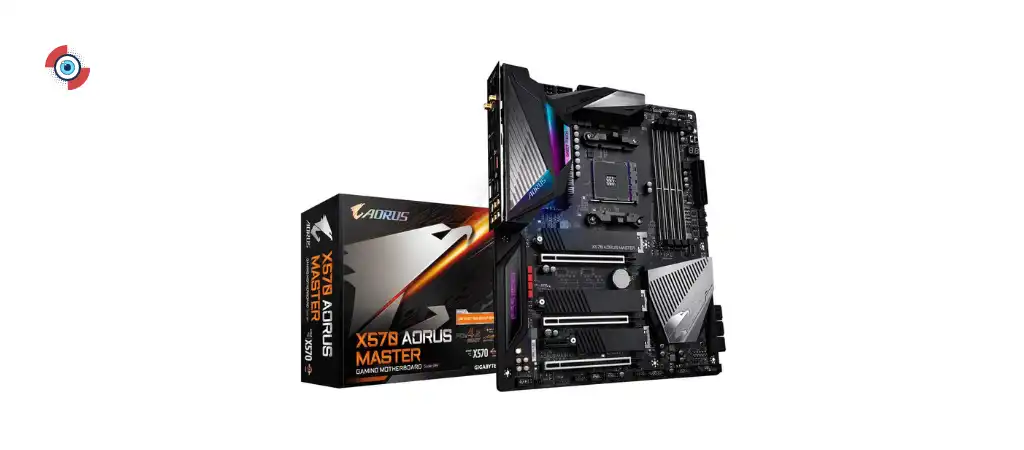
The Gigabyte Aorus X570 Master is a high-end motherboard designed for gamers and PC enthusiasts. It offers an array of advanced features and robust performance capabilities that cater to the demands of both casual and professional users.
In this review, we will explore the key features, specifications, and overall performance of these Best Motherboards for Gaming, while also presenting a balanced view of their pros and cons. Moreover, we will answer common questions to offer a comprehensive understanding of these products.

Key Features
-
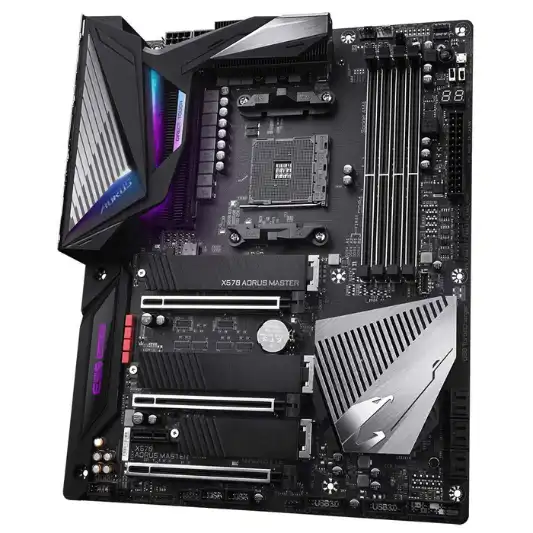
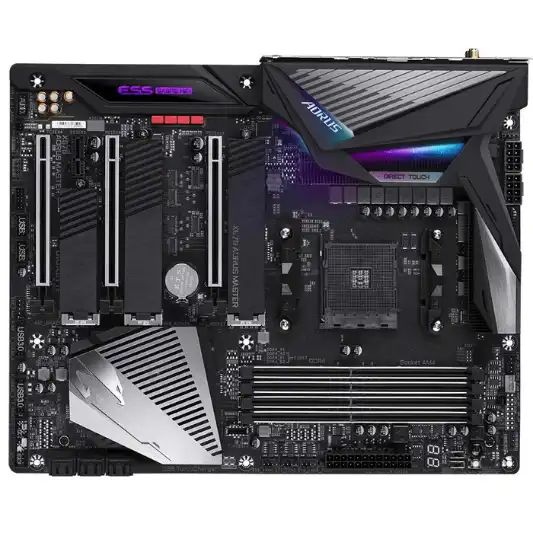
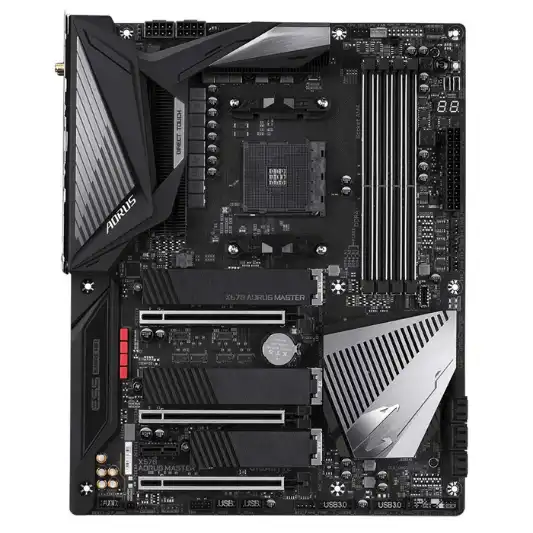
Direct 14 Phase Infineon Digital VRM Solution with PowIRstage
This feature ensures efficient power delivery to the CPU, enhancing stability and performance under heavy loads.
-
Triple PCIe 4.0 M.2 Slots with Thermal Guards
Provides high-speed storage options and ensures optimal cooling for your NVMe SSDs, preventing thermal throttling.
-
Intel WiFi 6 802.11ax and BT 5.0
Offers the latest wireless connectivity options with high speeds and low latency, ideal for gaming and streaming.
-
Rear 125dB SNR AMP-UP Audio with ALC1220-VB and ESS SABRE 9118 DAC
Delivers superior audio quality, enhancing your gaming and multimedia experience.
-
Dual LAN (Realtek 2.5GbE + Intel 1GbE) with cFosSpeed
Ensures fast and stable network connections with advanced bandwidth management.
-
Support for AMD 2nd and 3rd Generation Ryzen Processors
Offers compatibility with a range of powerful CPUs, making it a versatile choice for various builds.
-
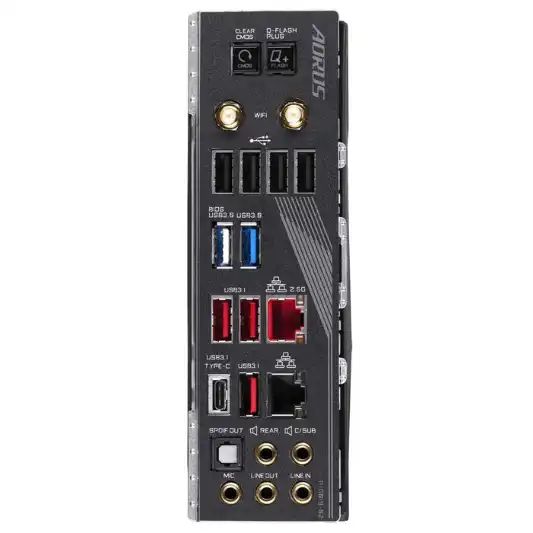
14 USB Ports
Provides extensive connectivity options for peripherals and external devices.
Specifications
| Specification | Details |
|---|---|
| Brand | GIGABYTE |
| Model | X570 AORUS MASTER |
| CPU Socket | Socket AM4 |
| Compatible Processors | AMD 2nd Generation Ryzen, AMD 3rd Generation Ryzen |
| Chipset | AMD X570 |
| Memory Technology | DDR4 |
| Maximum RAM Capacity | 128 GB |
| PCIe Slots | Triple PCIe 4.0 x4 M.2 |
| Audio | ALC1220-VB, ESS SABRE 9118 DAC |
| Networking | Intel WiFi 6 802.11ax, BT 5.0, Realtek 2.5GbE, Intel 1GbE |
| USB Ports | 14 |
| Dimensions | 30.5 x 24.4 x 4 cm |
| Weight | 2.2 kg |
| Power Supply | 12 Volts |
| Warranty | 3 years |
Pros and Cons
Pros:
- Excellent power delivery with 14 phase VRM
- High-speed storage with PCIe 4.0 M.2 slots
- Superior audio quality
- Latest WiFi 6 and Bluetooth 5.0 connectivity
- Dual LAN ports for versatile networking
Cons:
- Higher price point
- Complex BIOS for beginners
Conclusion
The Gigabyte Aorus X570 Master stands out as a top-tier motherboard designed to meet the high demands of gamers, content creators, and PC enthusiasts. Its robust power delivery system, courtesy of the 14 phase Infineon Digital VRM solution, ensures that even the most power-hungry processors can perform optimally without any stability issues. This is particularly beneficial for users who engage in heavy multitasking or overclocking.
The inclusion of triple PCIe 4.0 M.2 slots with thermal guards is a significant advantage for those looking to maximize their storage speed. These slots provide ample room for high-speed NVMe SSDs, ensuring quick data access and reduced load times. The thermal guards play a crucial role in maintaining the temperature of the SSDs, preventing thermal throttling and ensuring sustained performance.
In terms of connectivity, the motherboard is equipped with Intel WiFi 6 802.11ax and Bluetooth 5.0, offering the latest and fastest wireless standards. This ensures low latency and high-speed internet connectivity, which is essential for online gaming and streaming. Additionally, the dual LAN ports (Realtek 2.5GbE and Intel 1GbE) provide versatile networking options, allowing for efficient network management and faster data transfer rates.
The audio capabilities of the Gigabyte Aorus X570 Master are noteworthy. The combination of the ALC1220-VB codec and the ESS SABRE 9118 DAC, along with WIMA audio capacitors, delivers exceptional sound quality. This is a significant benefit for gamers and audiophiles who require crisp and clear audio for an immersive experience.
However, the motherboard is not without its drawbacks. The high-end features and advanced components come at a premium price, making it a more considerable investment compared to other motherboards. Additionally, the BIOS interface, while powerful and feature-rich, can be complex for beginners to navigate. This might require some learning and adjustment for users who are new to advanced BIOS settings.
You Might Be Interested In
- MSI Mag B550 Tomahawk Review
- Asus Tuf Gaming B550m Plus Review
- MSI MPG B550 Gaming Carbon Wifi Review
- 10 Best Motherboard For Gaming
- MSI MPG Z490 Gaming Edge WiFi Review
Highly Recommended – ⭐⭐⭐⭐⭐
If you’re in the market for a high-performance motherboard that offers robust features, superior audio quality, and advanced connectivity options, the Gigabyte Aorus X570 Master is an excellent choice. Its compatibility with the latest Ryzen processors and support for PCIe 4.0 make it a future-proof investment for any serious PC builder. Don’t miss out on the opportunity to elevate your gaming and computing experience. Order your Gigabyte Aorus X570 Master today and take the first step towards building your dream PC!
Gigabyte Aorus X570 Master vs. Competitors
The Gigabyte Aorus X570 Master is a high-end motherboard, and it faces stiff competition from other manufacturers. To provide a comprehensive view, we’ll compare it with three notable competitors in the same category: the ASUS ROG Crosshair VIII Hero, the MSI MEG X570 ACE, and the ASRock X570 Taichi. This comparison will help highlight the strengths and weaknesses of each motherboard.
Key Specifications Comparison
| Feature/Specification | Gigabyte Aorus X570 Master | ASUS ROG Crosshair VIII Hero | MSI MEG X570 ACE | ASRock X570 Taichi |
|---|---|---|---|---|
| CPU Socket | AM4 | AM4 | AM4 | AM4 |
| Chipset | X570 | X570 | X570 | X570 |
| VRM Phases | 14 | 14+2 | 12+2+1 | 14 |
| Memory Support | DDR4, up to 128 GB | DDR4, up to 128 GB | DDR4, up to 128 GB | DDR4, up to 128 GB |
| PCIe 4.0 Slots | 3 M.2 with thermal guards | 2 M.2 with heatsinks | 3 M.2 with Shield Frozr | 3 M.2 with heatsinks |
| Audio | ALC1220-VB, ESS SABRE 9118 DAC | SupremeFX S1220 | ALC1220 | Realtek ALC1220 |
| Networking | WiFi 6, 2.5GbE + 1GbE LAN | WiFi 6, 1GbE + 1GbE LAN | WiFi 6, 2.5GbE + 1GbE LAN | WiFi 6, 2.5GbE + 1GbE LAN |
| USB Ports | 14 | 12 | 12 | 10 |
| Form Factor | ATX | ATX | ATX | ATX |
| Price Range | High-End | High-End | High-End | High-End |
Detailed Comparison
1. Power Delivery and VRM Phases
-
Gigabyte Aorus X570 Master
Equipped with a 14 phase Infineon Digital VRM solution, the Aorus X570 Master provides excellent power delivery, which is essential for stable overclocking and high-performance operation.
-
ASUS ROG Crosshair VIII Hero
This motherboard features a 14+2 power stage design, offering robust power delivery that rivals the Aorus X570 Master. ASUS’ reputation for high-quality components ensures reliability and stability.
-
MSI MEG X570 ACE
The MSI MEG X570 ACE has a 12+2+1 phase power delivery system, which, while slightly less robust than the Aorus and ASUS models, still provides solid overclocking performance.
-
ASRock X570 Taichi
Similar to the Aorus X570 Master, the ASRock X570 Taichi features a 14 phase VRM design, ensuring efficient power delivery and stability under heavy loads.
2. PCIe and Storage Options
-
Gigabyte Aorus X570 Master
Offers three PCIe 4.0 M.2 slots, each with thermal guards to prevent overheating and maintain performance.
-
ASUS ROG Crosshair VIII Hero
Provides two PCIe 4.0 M.2 slots with heatsinks, which is slightly less than the Aorus but still sufficient for most users.
-
MSI MEG X570 ACE
Also features three PCIe 4.0 M.2 slots, similar to the Aorus, but with MSI’s Shield Frozr technology for enhanced cooling.
-
ASRock X570 Taichi
Matches the Aorus with three PCIe 4.0 M.2 slots and integrated heatsinks for thermal management.
3. Audio Quality
-
Gigabyte Aorus X570 Master
Stands out with its ALC1220-VB codec and ESS SABRE 9118 DAC, providing high-fidelity audio for audiophiles and gamers alike.
-
ASUS ROG Crosshair VIII Hero
Features the SupremeFX S1220 codec, known for delivering high-quality audio and immersive sound experiences.
-
MSI MEG X570 ACE
Utilizes the ALC1220 codec, offering good audio quality but not quite on par with the ESS SABRE 9118 DAC of the Aorus.
-
ASRock X570 Taichi
Equipped with the Realtek ALC1220 codec, providing reliable audio quality suitable for most users.
4. Networking Capabilities
-
Gigabyte Aorus X570 Master
Includes Intel WiFi 6, 2.5GbE LAN, and 1GbE LAN, providing versatile and high-speed networking options.
-
ASUS ROG Crosshair VIII Hero
Comes with Intel WiFi 6 and dual 1GbE LAN ports, offering solid networking capabilities but lacking the 2.5GbE option.
-
MSI MEG X570 ACE
Offers Intel WiFi 6, 2.5GbE LAN, and 1GbE LAN, matching the networking capabilities of the Aorus X570 Master.
-
ASRock X570 Taichi
Also includes Intel WiFi 6, 2.5GbE LAN, and 1GbE LAN, providing a similar networking setup to the Aorus.
5. USB Connectivity
-
Gigabyte Aorus X570 Master
Leads with a total of 14 USB ports, offering extensive connectivity for various peripherals and devices.
-
ASUS ROG Crosshair VIII Hero
Features 12 USB ports, which is slightly fewer than the Aorus but still ample for most users.
-
MSI MEG X570 ACE
Also provides 12 USB ports, ensuring good connectivity options for peripherals.
-
ASRock X570 Taichi
Offers 10 USB ports, which is the least among the compared models but should still be sufficient for typical usage.
Pros and Cons of Each Motherboard
Gigabyte Aorus X570 Master
-
Pros
Excellent power delivery, superior audio quality, extensive USB connectivity, advanced networking options.
-
Cons
Higher price point, complex BIOS for beginners.
ASUS ROG Crosshair VIII Hero
-
Pros
Robust power delivery, high-quality audio, solid build quality, good networking capabilities.
-
Cons
Fewer PCIe M.2 slots, slightly lower USB port count.
MSI MEG X570 ACE
-
Pros
Good power delivery, extensive PCIe M.2 slots with advanced cooling, reliable audio, versatile networking options.
-
Cons
Slightly fewer VRM phases, complex BIOS.
ASRock X570 Taichi
-
Pros
Solid power delivery, good audio quality, versatile networking options, competitive pricing.
-
Cons
Fewer USB ports, less intuitive BIOS.
FAQs
What processors are compatible with the Gigabyte Aorus X570 Master?
The Gigabyte Aorus X570 Master is compatible with AMD’s 2nd and 3rd Generation Ryzen processors. This includes CPUs from the Ryzen 2000 and 3000 series, providing a wide range of options for users looking to build a powerful PC. The AM4 socket ensures that the motherboard can support these processors seamlessly, offering both performance and efficiency.
Does the Gigabyte Aorus X570 Master support overclocking?
Yes, the Gigabyte Aorus X570 Master supports overclocking. The 14 phase Infineon Digital VRM solution with PowIRstage is designed to provide stable and efficient power delivery, which is crucial for overclocking. This allows users to push their CPUs to higher clock speeds while maintaining system stability. The advanced BIOS settings also offer extensive options for fine-tuning and optimizing performance.
What are the benefits of the PCIe 4.0 slots on the Gigabyte Aorus X570 Master?
The PCIe 4.0 slots on the Gigabyte Aorus X570 Master offer twice the bandwidth of PCIe 3.0 slots, providing faster data transfer rates for compatible devices. This is particularly beneficial for NVMe SSDs, which can achieve significantly higher read and write speeds compared to previous generations. The triple M.2 slots with thermal guards ensure that these high-speed drives remain cool and perform optimally without throttling.
How is the audio quality on the Gigabyte Aorus X570 Master?
The audio quality on the Gigabyte Aorus X570 Master is excellent. The motherboard features the Realtek ALC1220-VB codec and the ESS SABRE 9118 DAC, which deliver high-fidelity sound. Additionally, the WIMA audio capacitors enhance audio clarity and richness. This setup ensures that users experience superior audio, whether for gaming, music, or multimedia purposes.
What networking options are available on the Gigabyte Aorus X570 Master?
The Gigabyte Aorus X570 Master offers a range of networking options, including Intel WiFi 6 802.11ax, Bluetooth 5.0, Realtek 2.5GbE LAN, and Intel 1GbE LAN. WiFi 6 provides faster wireless speeds, reduced latency, and improved network efficiency, making it ideal for gaming and streaming. The dual LAN ports offer versatile wired network connectivity, allowing for faster data transfer and better network management.
