



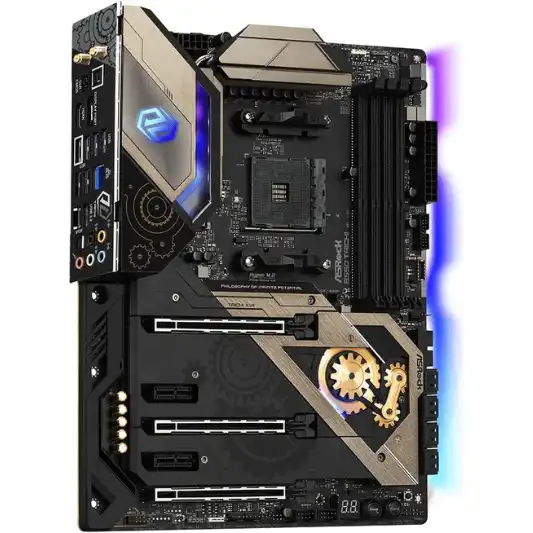
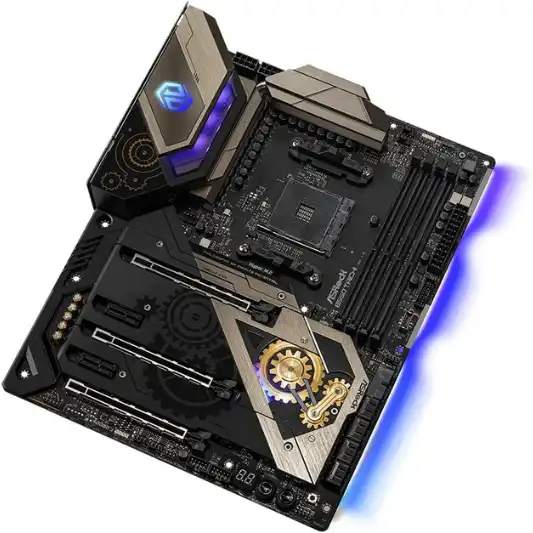
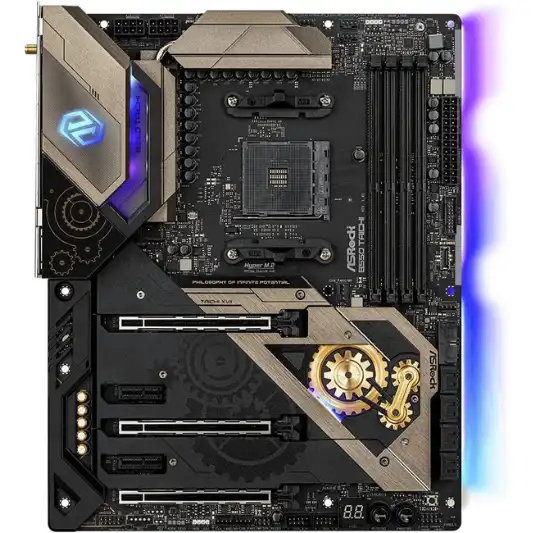
The ASRock B550 Taichi is a top-tier motherboard designed to support the 3rd Gen AMD AM4 Ryzen and future AMD Ryzen processors. Built with gamers and PC enthusiasts in mind, it offers a rich array of features, high durability, and top performance.
This review delves into the key features, specifications, pros and cons, a detailed conclusion, and answers to some frequently asked questions to help you decide if this is the best motherboard for gaming and your next build.

Key Features
AMD AM4 Ryzen Processors
The ASRock B550 Taichi is compatible with a range of AMD Ryzen processors, ensuring flexibility for current and future upgrades.
16 Power Phase Design
The motherboard features a robust 16 power phase design, which ensures stable and efficient power delivery, critical for overclocking and high-performance tasks.
Digi Power and Dr. MOS
The Digi Power and Dr. MOS technologies provide enhanced performance and precision in power management, leading to better overall system stability and efficiency.
Support for DDR4 4733+ (OC) Memory
With support for DDR4 memory speeds of up to 4733+ MHz when overclocked, the B550 Taichi allows for significant performance boosts, particularly beneficial for gaming and intensive computing tasks.
PCIe 4.0 and PCIe 3.0 Slots
The motherboard comes with 3 PCIe 4.0/3.0 x16 slots and 2 PCIe 3.0 x1 slots, providing ample connectivity for GPUs, NVMe SSDs, and other expansion cards.
Graphics Output Options
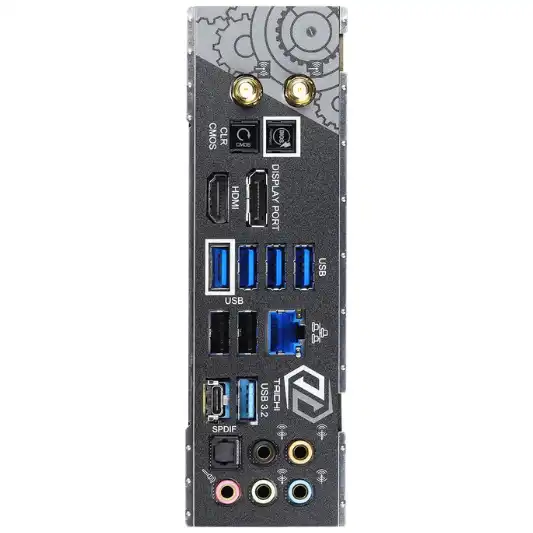
Equipped with both HDMI and DisplayPort, the B550 Taichi supports multiple display configurations, catering to diverse user needs.
Comprehensive Connectivity
The motherboard features multiple USB ports, including USB 3.2 Gen2, USB 3.2 Gen1, and USB 2.0, along with Bluetooth support, ensuring versatile connectivity options for various peripherals.
Specifications
| Specification | Details |
|---|---|
| Brand | ASRock |
| CPU Socket | Socket AM4 |
| Compatible Devices | Gaming Console, Personal Computer |
| RAM Memory Technology | DDR4 |
| Compatible Processors | AMD Ryzen 3rd Generation |
| Chipset Type | AMD B550 |
| Memory Clock Speed | 2400 MHz |
| Platform | Windows 10 |
| Model Name | B550 TAICHI |
| Memory Storage Capacity | 8 GB |
| Wireless Type | Bluetooth |
| Number of USB 2.0 Ports | 2 |
| Operating System | Microsoft Windows 10 64-bit / 11 64-bit |
| Item Weight | 2.64 pounds |
| Product Dimensions | 12.2 x 15 x 5 inches |
| Item Dimensions LxWxH | 12.2 x 15 x 5 inches |
| Number of Processors | 4 |
| Computer Memory Type | DDR4 SDRAM |
| Manufacturer | ASRock |
| Date First Available | June 16, 2020 |
Pros and Cons
Pros
- Supports Latest AMD Processors: Ensures future-proofing with compatibility for upcoming AMD Ryzen CPUs.
- Robust Power Design: Excellent for overclocking and high-performance stability.
- High Memory Speed Support: Capable of handling extremely fast DDR4 memory modules.
- Multiple Expansion Slots: Offers ample room for GPUs and other peripherals.
- Versatile Connectivity: Includes a variety of USB ports and Bluetooth support.
Cons
- Price: It is relatively expensive compared to other B550 motherboards.
- Size: The large form factor might not fit in all cases.
- Overkill for Basic Users: Might be more than what a non-enthusiast or non-gamer needs.
Conclusion
The ASRock B550 Taichi is a high-performance motherboard that delivers exceptional value for enthusiasts and gamers. Its support for the latest and future AMD Ryzen processors ensures that users are not left behind as new technologies emerge. The 16 power phase design, combined with Digi Power and Dr. MOS, provides unparalleled power stability and efficiency, making it ideal for overclocking and demanding applications.
One of the standout features of this motherboard is its support for DDR4 memory speeds up to 4733+ MHz when overclocked. This capability ensures that your system can handle the latest and most demanding applications and games with ease. The presence of multiple PCIe slots, including the latest PCIe 4.0, allows for a variety of expansion options, catering to different user needs, from gaming to content creation.
The connectivity options on the ASRock B550 Taichi are comprehensive, with multiple USB ports and both HDMI and DisplayPort outputs. This versatility ensures that you can connect a wide range of peripherals and display configurations. The inclusion of Bluetooth further enhances the connectivity suite, making it easier to connect wireless devices.
However, the B550 Taichi does come with a few downsides. Its premium price tag might be a deterrent for budget-conscious buyers. Additionally, the large form factor may pose compatibility issues with smaller cases. Lastly, while its extensive features are great for enthusiasts and gamers, they might be overkill for users who do not require such high performance or numerous connectivity options.
In conclusion, the ASRock B550 Taichi is a top-tier motherboard that excels in performance, durability, and features. It is an excellent choice for gamers and PC enthusiasts who want a future-proof solution that can handle the latest and upcoming technologies. While it may not be the most budget-friendly option, its robust feature set justifies the price for those who need its capabilities.
You Might Be Interested In
- MSI MPG Z490 Gaming Edge WiFi Review
- Asus Rog Strix Z590-E Gaming Wifi Review
- 10 Best Motherboard For Gaming
- Asus Prime Z590-A Review
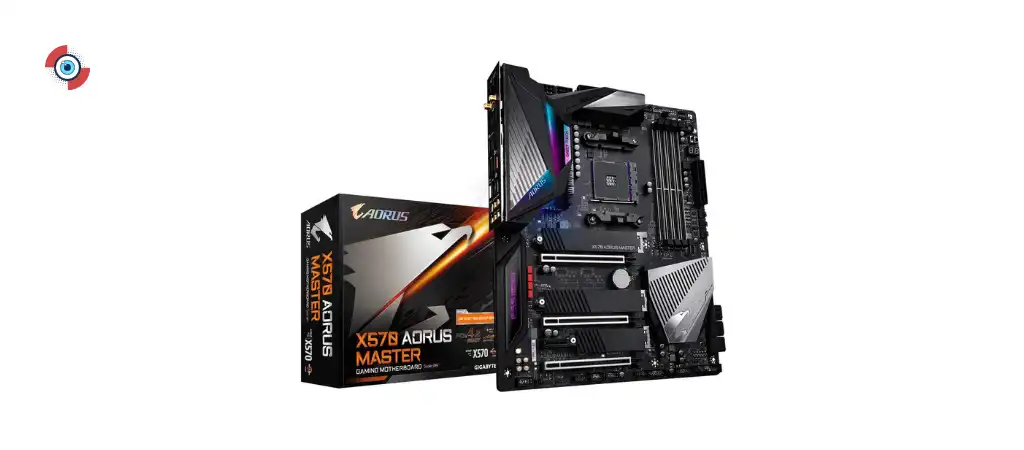
- Gigabyte Aorus X570 Master Review
Highly Recommended – ⭐⭐⭐⭐⭐
The ASRock B550 Taichi is an outstanding motherboard for those looking to build a high-performance gaming rig or workstation. Its support for the latest and future AMD Ryzen processors, robust power design, and extensive connectivity options make it a future-proof choice. If you are ready to take your PC to the next level, consider the ASRock B550 Taichi for your next build.
ASRock B550 Taichi Comparison with Similar Products
The ASRock B550 Taichi is a high-end motherboard designed to support 3rd Gen AMD AM4 Ryzen and future AMD Ryzen processors. To provide a comprehensive understanding of its value, we will compare it with three similar motherboards: the ASUS ROG Strix B550-E Gaming, MSI MPG B550 Gaming Edge WiFi, and Gigabyte B550 AORUS Master.
Key Features and Specifications Comparison
| Feature/Specification | ASRock B550 Taichi | ASUS ROG Strix B550-E Gaming | MSI MPG B550 Gaming Edge WiFi | Gigabyte B550 AORUS Master |
|---|---|---|---|---|
| CPU Socket | AM4 | AM4 | AM4 | AM4 |
| Chipset | B550 | B550 | B550 | B550 |
| Power Phases | 16 | 14 | 14 | 16+2 |
| Memory Support | DDR4 4733+ (OC) | DDR4 4600+ (OC) | DDR4 4866+ (OC) | DDR4 5400+ (OC) |
| PCIe Slots | 3 PCIe 4.0/3.0 x16, 2 PCIe 3.0 x1 | 2 PCIe 4.0/3.0 x16, 1 PCIe 3.0 x16, 1 PCIe 3.0 x1 | 2 PCIe 4.0/3.0 x16, 2 PCIe 3.0 x1 | 3 PCIe 4.0/3.0 x16, 1 PCIe 3.0 x1 |
| USB Ports | Multiple USB 3.2 Gen2, USB 3.2 Gen1, USB 2.0 | Multiple USB 3.2 Gen2, USB 3.2 Gen1, USB 2.0 | Multiple USB 3.2 Gen2, USB 3.2 Gen1, USB 2.0 | Multiple USB 3.2 Gen2, USB 3.2 Gen1, USB 2.0 |
| Wireless Connectivity | Bluetooth | Wi-Fi 6, Bluetooth | Wi-Fi 6, Bluetooth | Wi-Fi 6, Bluetooth |
| Audio | High Definition Audio | SupremeFX S1220A | Realtek ALC1200 | Realtek ALC1220-VB |
| Form Factor | ATX | ATX | ATX | ATX |
| Price | ~$300 | ~$280 | ~$220 | ~$360 |
Detailed Comparison
ASRock B550 Taichi vs. ASUS ROG Strix B550-E Gaming
-
Performance and Power Delivery:
Both motherboards provide excellent power delivery systems, with the ASRock B550 Taichi featuring a 16 power phase design, while the ASUS ROG Strix B550-E Gaming has a 14 power phase design. The Taichi might have a slight edge in power stability and overclocking potential.
-
Memory Support
The Taichi supports DDR4 memory speeds up to 4733+ MHz (OC), whereas the ASUS ROG Strix supports up to 4600+ MHz (OC). The difference is marginal and might not significantly impact most users.
-
Expansion Slots
The Taichi offers 3 PCIe 4.0/3.0 x16 slots and 2 PCIe 3.0 x1 slots, providing more flexibility for multi-GPU setups compared to the ASUS ROG Strix, which has 2 PCIe 4.0/3.0 x16 slots, 1 PCIe 3.0 x16 slot, and 1 PCIe 3.0 x1 slot.
-
Connectivity
Both motherboards feature a comprehensive range of USB ports. However, the ASUS ROG Strix B550-E Gaming includes Wi-Fi 6, offering faster and more reliable wireless connectivity compared to the Taichi, which lacks built-in Wi-Fi.
-
Audio
The ASUS ROG Strix B550-E Gaming features SupremeFX S1220A audio, which may provide a slightly better audio experience compared to the high-definition audio on the Taichi.
-
Price
The Taichi is generally more expensive (
$300) compared to the ASUS ROG Strix ($280). For users prioritizing built-in Wi-Fi and audio quality, the ASUS ROG Strix might offer better value.
ASRock B550 Taichi vs. MSI MPG B550 Gaming Edge WiFi
-
Performance and Power Delivery
The ASRock B550 Taichi’s 16 power phase design outshines the MSI MPG B550 Gaming Edge WiFi’s 14 power phase design, making the Taichi better suited for overclocking and power-hungry tasks.
-
Memory Support
The MSI MPG B550 Gaming Edge WiFi supports slightly higher memory speeds (up to 4866+ MHz OC) compared to the Taichi’s 4733+ MHz (OC). This minor difference may appeal to those aiming for the highest possible memory speeds.
-
Expansion Slots
The Taichi provides more PCIe 4.0 slots (3 PCIe 4.0/3.0 x16), offering greater flexibility for expansion compared to the MSI board, which has 2 PCIe 4.0/3.0 x16 slots and 2 PCIe 3.0 x1 slots.
-
Connectivity
Both motherboards offer similar USB connectivity and Bluetooth support, but the MSI board includes built-in Wi-Fi 6, providing better wireless networking capabilities than the Taichi.
-
Audio
The MSI MPG B550 Gaming Edge WiFi features Realtek ALC1200 audio, which is good but slightly inferior to the high-definition audio found on the Taichi.
-
Price
The MSI MPG B550 Gaming Edge WiFi is more affordable (~$220), making it a better budget option for users who still want strong performance and built-in Wi-Fi.
ASRock B550 Taichi vs. Gigabyte B550 AORUS Master
-
Performance and Power Delivery
Both motherboards excel in power delivery, with the Gigabyte B550 AORUS Master featuring a robust 16+2 phase design compared to the Taichi’s 16 phase design. The AORUS Master might have a slight advantage in extreme overclocking scenarios.
-
Memory Support
The AORUS Master supports higher memory speeds (up to 5400+ MHz OC), making it more suitable for users aiming for maximum memory performance compared to the Taichi’s 4733+ MHz (OC).
-
Expansion Slots
Both motherboards offer ample expansion options, with the Taichi having 3 PCIe 4.0/3.0 x16 slots and 2 PCIe 3.0 x1 slots, while the AORUS Master also provides 3 PCIe 4.0/3.0 x16 slots and 1 PCIe 3.0 x1 slot.
-
Connectivity
Both motherboards feature extensive USB options, Bluetooth support, and Wi-Fi 6, ensuring versatile and high-speed connectivity.
-
Audio
The Gigabyte B550 AORUS Master is equipped with Realtek ALC1220-VB audio, which offers superior sound quality compared to the high-definition audio on the Taichi.
-
Price
The AORUS Master is the most expensive option (~$360), which may be justified by its superior memory support, enhanced power delivery, and top-notch audio quality.
FAQs
What processors are compatible with the ASRock B550 Taichi, and how does it handle future upgrades?
The ASRock B550 Taichi supports a wide range of AMD processors, specifically the 3rd Gen AMD AM4 Ryzen processors. This includes the Ryzen 3000 series, which are known for their excellent performance and efficiency. Moreover, the motherboard is designed with future upgrades in mind. ASRock has ensured that the B550 Taichi will be compatible with future AMD Ryzen processors through BIOS updates.
This forward compatibility means that users can confidently purchase this motherboard, knowing that it will support upcoming advancements in AMD processor technology without requiring a complete system overhaul.
How does the ASRock B550 Taichi perform in terms of overclocking, and what features support this capability?
The ASRock B550 Taichi is exceptionally well-suited for overclocking, thanks to its robust design and advanced features. It boasts a 16 power phase design, which ensures stable and efficient power delivery to the CPU, a critical factor for maintaining system stability under overclocked conditions. The Digi Power and Dr. MOS technologies further enhance the precision and efficiency of power management.
These features allow users to push their CPUs and memory modules to higher frequencies safely. The motherboard also supports DDR4 memory speeds up to 4733+ MHz when overclocked, providing significant performance boosts. Overall, the B550 Taichi’s architecture and power management capabilities make it a prime choice for enthusiasts looking to maximize their system’s performance through overclocking.
What are the connectivity options available on the ASRock B550 Taichi, and does it support modern peripherals and accessories?
The ASRock B550 Taichi offers a comprehensive range of connectivity options, ensuring compatibility with modern peripherals and accessories. The motherboard includes multiple USB ports, such as USB 3.2 Gen2, USB 3.2 Gen1, and USB 2.0, providing high-speed data transfer and connectivity for a wide array of devices.
Additionally, the B550 Taichi is equipped with Bluetooth support, allowing for wireless connectivity with Bluetooth-enabled devices like headphones, keyboards, and mice. For display outputs, it features both HDMI and DisplayPort, supporting various monitor setups and configurations. These extensive connectivity options make the B550 Taichi a versatile and future-proof choice for building a modern PC.
Can you elaborate on the memory compatibility of the ASRock B550 Taichi? What should users know about installing and optimizing RAM?
The ASRock B550 Taichi is designed to support DDR4 memory technology, which is the current standard for performance and efficiency. It supports memory speeds up to 4733+ MHz when overclocked, allowing users to take full advantage of high-speed RAM modules. This capability is particularly beneficial for gaming, content creation, and other intensive computing tasks that demand fast and responsive memory.
The motherboard has multiple DIMM slots, supporting dual-channel memory configurations, which further enhance performance. Users should ensure that they are installing memory modules in the correct slots to leverage the dual-channel architecture. Additionally, for optimal performance, it is recommended to use memory modules from the motherboard’s QVL (Qualified Vendor List), which ASRock has tested and verified for compatibility and stability.
What are the physical dimensions of the ASRock B550 Taichi, and what should users consider regarding case compatibility and installation?
The ASRock B550 Taichi has physical dimensions of 12.2 x 15 x 5 inches. This large form factor, typically classified as ATX, requires a compatible PC case that can accommodate its size. Users should ensure that their case supports ATX motherboards and has adequate space for other components and cable management.
Additionally, considering the size of the B550 Taichi, it is important to check the clearance for components like the CPU cooler and GPUs, especially if planning to use high-performance or oversized versions. Proper installation involves ensuring that all standoffs are correctly placed to prevent short circuits and that the motherboard is securely mounted. Adequate airflow and cooling solutions should also be planned to maintain optimal performance and longevity of the components.
